Implementing Payload NextJS with MongoDB Atlas Search for Enhanced Performance




This is the written guide for our tutorial for Adding Super fast MongoDB Atlas Search to Payload CMS. You can find the full length video here:
https://www.youtube.com/watch?v=61FnDV8PL1A
In this article, we will explore how to integrate MongoDB Atlas Search into your Payload NextJS project. By leveraging this powerful search functionality, you can significantly improve performance and flexibility, especially when dealing with large datasets.
Table of Contents
- Introduction to MongoDB Atlas Search
- The Flexibility of Payload NextJS
- Building the Aggregation Pipeline
- Executing the Search Query
- Handling Access Control in Payload
- Testing the Performance Improvement
- Conclusion and Feedback Request
- FAQ
Introduction to MongoDB Atlas Search
MongoDB Atlas Search is a powerful feature that enhances the search capabilities of your MongoDB database. Unlike traditional search methods, which can be limited in functionality and performance, Atlas Search leverages advanced indexing and querying capabilities. This allows for more complex search queries, such as fuzzy matching and relevance-based ranking, making it ideal for applications with large datasets.
By integrating MongoDB Atlas Search into your Payload NextJS project, you can significantly improve user experience and application performance. This section will explore the key features of Atlas Search and why it's a valuable addition to your development toolkit.
Why Upgrade to Atlas Search?
Upgrading to MongoDB Atlas Search offers several advantages:
- Performance: For large datasets, traditional regex searches can result in slow performance. Atlas Search is optimized for speed, allowing you to handle hundreds of thousands of documents efficiently.
- Flexibility: Atlas Search supports advanced search features like fuzzy matching, which enables the application to return relevant results even with minor typos in user queries.
- Scalability: As your dataset grows, Atlas Search can scale seamlessly, ensuring that your application remains responsive.
- Rich Query Language: The powerful query capabilities allow for complex searching, filtering, and sorting options that enhance the overall search experience.
The Flexibility of Payload NextJS
Payload NextJS offers a unique advantage when integrating with MongoDB Atlas Search. You can easily create custom React components that meet your specific needs. This flexibility allows you to design a search interface that is both functional and user-friendly.
For instance, you can build a custom search bar that utilizes Atlas Search, while still maintaining the look and feel of your application. This means you can tailor your search experience without compromising on design or performance.
Moreover, Payload's architecture makes it straightforward to replace default components, ensuring that your implementation of Atlas Search is seamless and efficient.
Creating a Custom Endpoint
The first step in integrating MongoDB Atlas Search is to create a custom endpoint that overrides the default search functionality provided by Payload. This custom endpoint will intercept incoming requests and redirect them to your Atlas Search implementation.
To create this endpoint, follow these steps:
- Create an endpoint array in your Payload configuration.
- Add an object with a method of
getand leave the path blank, setting it to a slash. - Link the endpoint to your custom handler function that will handle the search requests.
This setup allows you to control how search queries are processed, enabling you to use MongoDB Atlas Search when appropriate.
Setting Up Atlas Search Index
Before implementing Atlas Search in your application, you'll need to create an Atlas Search index in your MongoDB database. This is a crucial step that enables the advanced search capabilities of Atlas.
To set up an index:
- Navigate to your MongoDB project and click on Search in the top bar.
- Click on Create Index, and choose your preferred editor—JSON or visual.
- Select the collection you want to enable the index for and click Next.
- Finally, click on Create Search Index.
Keep in mind that building the index may take a few minutes. Once it's ready, you'll be able to leverage its capabilities in your custom search implementation.
Implementing the Custom Handler Function
Now that you have your custom endpoint and Atlas Search index set up, it's time to implement the handler function. This function will handle incoming search requests and utilize Atlas Search to fetch relevant documents.
Your handler function should:
- Check for access control to ensure that only authorized users can perform searches.
- Examine the request query to determine if there is a search string present.
- Extract the Mongoose model from Payload for your collection.
- Construct an aggregation pipeline that includes the
$searchstage with your query. - Fetch the relevant document IDs and then make a second query to retrieve the actual documents using Payload's access control.
This two-step querying process not only improves performance but also ensures that you adhere to the access control rules set in your Payload configuration.
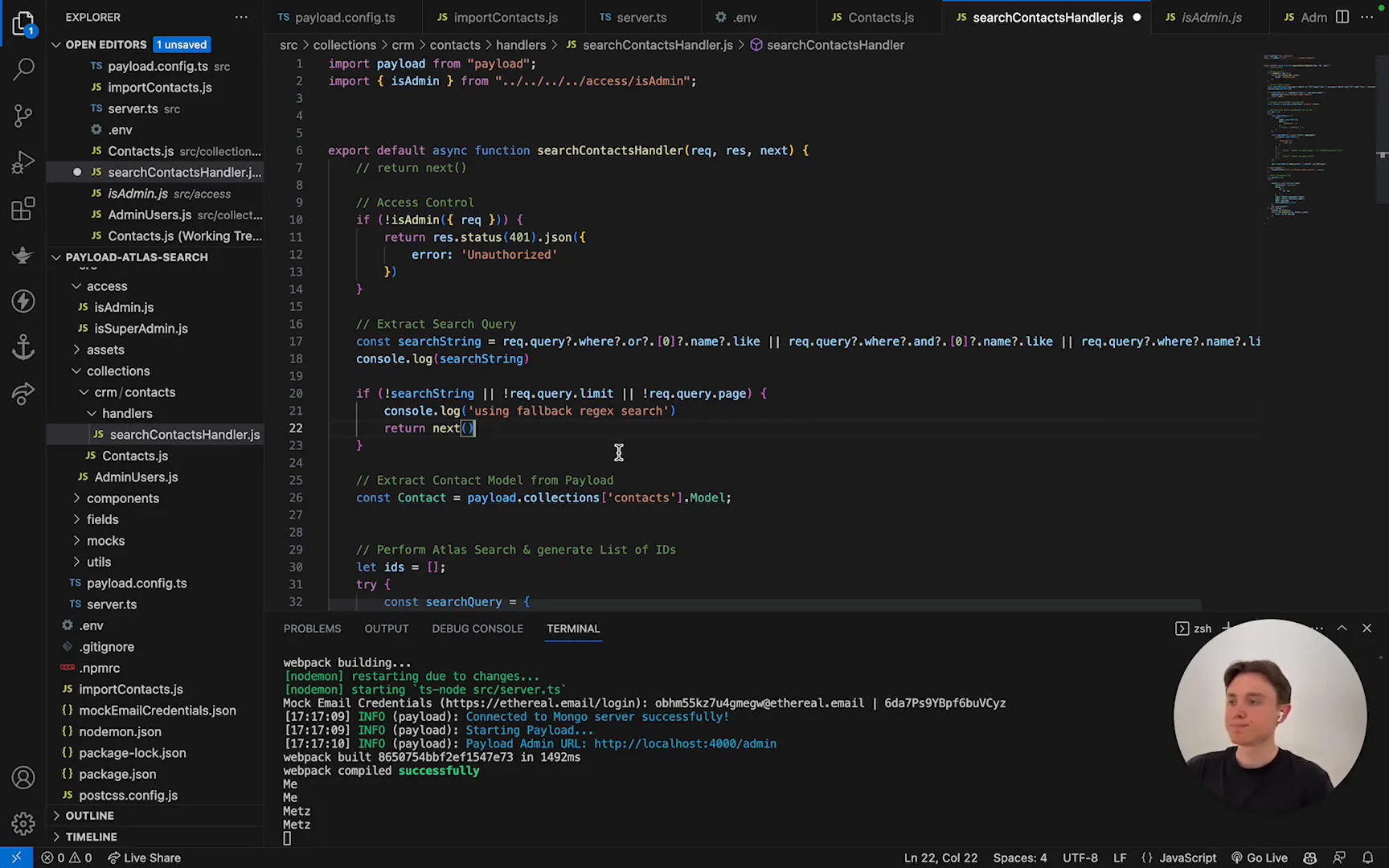
The implementation is straightforward, and by following these steps, you can create a robust search functionality that leverages the full potential of MongoDB Atlas Search.
Building the Aggregation Pipeline
To leverage the power of MongoDB Atlas Search, we need to construct an aggregation pipeline. This pipeline will handle the search queries efficiently, ensuring that we get the desired results quickly.
Here's how to build a basic aggregation pipeline:
- Start with the
$searchstage, which takes in your search query. This can be a simple text search or a more complex fuzzy search. - Follow this with a
$projectstage to specify the fields you want to return. In our case, we will focus on returning only the document IDs. - Optionally, you can add additional stages to sort or filter your results further, depending on your application's needs.
By structuring your aggregation pipeline this way, you ensure that the search is both effective and efficient, allowing you to handle larger datasets seamlessly.

Executing the Search Query
Once the aggregation pipeline is in place, it's time to execute the search query. This involves calling the Mongoose model's aggregate method with our constructed pipeline.
Here’s a simplified example:
const results = await model.aggregate(pipeline);
Make sure to handle any errors that may arise during this process. You want to ensure that your application remains stable and provides meaningful feedback to users in case of an issue.

Handling Access Control in Payload
Access control is a critical aspect of any application, especially when dealing with sensitive data. In this implementation, we need to ensure that only authorized users can access the search results.
To integrate access control into your search functionality:
- Check the user's credentials before allowing them to perform a search.
- Utilize Payload's built-in access control mechanisms by passing the user object to the query.
- Set the
overrideAccessoption tofalseto enforce the access rules defined in your collection configuration.
By following these steps, you ensure that your search functionality not only performs efficiently but also adheres to the necessary security protocols, protecting your application and its users.

Testing the Performance Improvement
After implementing the aggregation pipeline and access control, it's crucial to test the performance of your search functionality. This will help you identify any bottlenecks and ensure that the integration of MongoDB Atlas Search is effective.
To perform your tests:
- Run search queries on your existing dataset and measure the time taken for results to return.
- Compare these times against the previous implementation using regex searches.
- Document any improvements in performance, particularly with larger datasets, to highlight the benefits of using Atlas Search.
By conducting thorough performance testing, you can confidently demonstrate the advantages of integrating MongoDB Atlas Search into your Payload NextJS project.
Conclusion and Feedback Request
In conclusion, integrating MongoDB Atlas Search into your Payload NextJS project can significantly enhance performance and flexibility. By following the steps outlined in this blog, you can create a powerful search functionality that scales with your dataset.
We value your feedback! If you have any thoughts on the implementation process or suggestions for improvement, please share your insights with us. Your input is invaluable as we continue to refine our approach and share knowledge within the community.
FAQ
What is MongoDB Atlas Search?
MongoDB Atlas Search is an advanced search capability integrated into MongoDB Atlas that allows for full-text search, filtering, and sorting of documents against large datasets.
How does Payload NextJS enhance the use of MongoDB Atlas Search?
Payload NextJS provides a flexible framework that allows developers to create custom React components and endpoints, making it easy to integrate advanced search functionalities tailored to specific application needs.
What are the main benefits of using MongoDB Atlas Search over traditional methods?
The main benefits include improved performance, advanced search features like fuzzy matching, scalability, and a rich query language that enables complex searching and filtering.
How can I ensure access control in my search implementation?
Implement access control by checking user credentials before executing search queries and utilizing Payload's built-in mechanisms to enforce access rules for sensitive data.
Can I customize the search experience further?
Yes! Payload NextJS allows you to create custom components and modify the search interface to suit your application's design and user experience requirements.